

As a travel content creator and YouTuber, we’ve spent years refining our filming process so we thought it was about time to share the secrets of what we think are the best cameras for videographers.
Looking through everything we typically use on a video project, we break down all of the camera gear that we use.
Our Favourite Camera Gear
In This Article
Choosing Your Camera Gear

Before we dive into the camera gear in the travel space, it’s worth talking about how we arrived at these recommendations.
Every photographer and videographer goes through their own journey and so we’d never say that these are things that you MUST buy. That’s why we try provide as much context as possible.
Our particular journey has been 15+ years in the making and has continued to evolve but here are some high-level thoughts on what’s gone into the decision-making process.
- Knowing the look you want to achieve – This is definitely something that takes time to figure out but broadly speaking, it’s the range of your videos being cinematic vs. vlog-like.
- Working with your budget – Camera gear is expensive so buy what you can afford and upgrade over time.
- Each camera serves a specific purpose – There’s always the dream of the one camera that can do it all but we can say from experience that this doesn’t exist. In the end, we’ve narrowed it down to the below few cameras that can get the job done for us in specific scenarios.
- Going lighter, smaller, and consolidating – This is even more important for travellers. Trust me, we used to shoot with Canon full-frame and I got to the point where I didn’t want to bring it around anymore. To that end, find a way to juggle less camera gear that works for you.
- Plan ahead – You don’t always need every camera for each trip/project. Have a shot list in your head and only bring the gear that you’ll need to capture those.
- Evolving with technology – Year after year, there is new gear that is released. You won’t be able to keep up with it all (and we certainly don’t suggest upgrading every time) but it’s always good to have a finger on the pulse of what’s new and what others are using (i.e. Insta360 being a great replacement for the GoPro).
Mirrorless DSLR Camera

For videography, the OM System OM-1 Mark 2, is what we rely on a majority of the time.
Not what you expected right? We’ve always felt like outliers in an industry where Sony, Canon, and Nikon dominate the field but ever since we decided to make the switch from our heavy full-frame Canon gear to Micro Four Thirds, we haven’t looked back.
Why OM System? There’s too many to name and unfortunately it’s an overlooked platform but to us, we choose OM System (previously Olympus) because it is the ultimate traveler and adventurer’s platform.
- Small, light, and compact body and lenses due to smaller sensor size.
- Best-in-class image stabilization, allowing you to film video without the use of a gimbal or tripod.
- A large range of lenses including a Pro lens line-up that stands up to the highest quality of build and glass.
- Designed to be rugged and has Pro lenses that has IP53 weather-sealing, making it splash-proof, freeze-proof, and dust-proof.
- Compatible with Panasonic Micro Four Thirds lenses which almost doubles your options.
- Excellent array computational features and subject detection. Many are for still photography and personally brings out a lot of joy because of how easy they make it (i.e. built-in ND filter, gradient-filter, long exposure, star-focus, Pro Capture, and bird subject detection).
To make things fair, we have to mention a few of the disadvantages of the system.
- Sensor size is a 4/3″ tacked BSI Live MOS sensor that provides 23 Megapixels in resolution which in today’s age feels outdated.
- Micro four thirds doesn’t quite give that same shallow depth of field as a full frame sensor does unless you’re using a lens that can stop down to f/1.7 such as the Panasonic 9mm F1.7 or Panasonic 10-25mm F1.7 which are both excellent for video work.
- It’s less “main stream” so there are fewer third-party accessories and video editing grading software designed for it (I’m thinking of FilmConvert’s CineMatch).
- Detail shots
- B-roll
- Talking-head
- Wildlife
- Slow-motion
- When we are looking for higher quality and depth of field
- Formats: MOV(MPEG-4AVC/H.264)/ MOV (HEVC/H.265)
- Color profiles: Flat, OM-Log400, HLG
- Maximum resolution: 3840×2160 (4K, up to 202 Mbps) and 4095×2160 (C4K, up to 202 Mbps)
- Maximum frames per second: 60FPS
- Autofocus: Phase detect, contrast detect, 1053 focus points
- Screen: Fully articulated 3″ touch screen
- Maximum recording time: Unlimited
- Vertical video: Yes
- Image stabilization: 5-axis up to 8 EV steps
Oh and what is that wrist strap? That’s the Peak Design Leash. Since we use Capture on a backpack or the 7L Outdoor Sling on most of my travels, we don’t need a neck strap as I don’t find it comfortable. We’ve also tested the Micro Clutch but we weren’t a fan either.
Side Note: It’s worth packing the Slide Lite in your backpack because you never know when it’s mandatory to wear one (i.e. Shibuya Sky or horseback riding experiences).
Recommended Mirrorless DSLR Camera Gear
[embedded content]
Action Camera
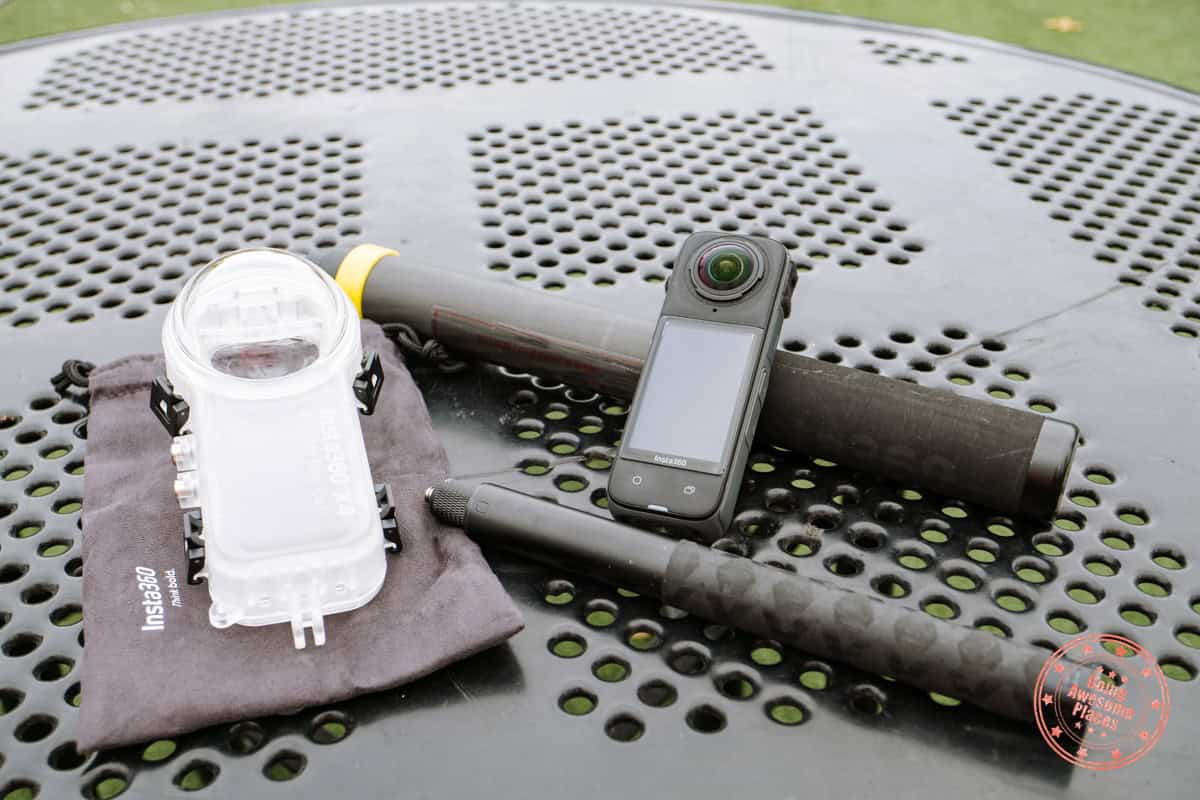
For us, we always make sure we incorporate adventure into our itineraries. This means there’s always a potential for activities such as treetop trekking, ziplining, scuba diving, mountain biking, stand up paddleboarding, canoeing, kayaking, ATV-ing, and more.
Our process has evolved over the years but currently, we primarily use one camera now that can do it all.
Insta360 X4
A monumental change in the past 5 years has been in the action camera department.
We had the original GoPro back in the day and continued to go through periodic updates until the GoPro Hero 10. However, we found ourselves grabbing this camera a lot less when we discovered the Insta360 X-series of cameras.
We currently use the Insta360 X4, an 8K 360 degree action camera and thanks to its magical ability to make the selfie stick disappear and capturing all angles, we’ve thrown our GoPro out. The invisible selfie stick gives you a whole new level of freedom to create than ever before.
Yes, we’re a bit outdated but hoping to upgrade to the Insta360 X5 soon!
Tell me if you can relate. With the traditional action camera, we’ve always had the problem of not knowing if it’s pointing the right way. I don’t know how many times I’ve gone back to edit footage, only to realize that I pointed the camera too far up or down. In action sports, you only have one shot when you travel and that’s it so you want to make it count.
The ultimate advantage of the Insta360 X4 is that you can set it to record and reframe it in post after-the-fact thanks to its 8K or 5.7K resolutions all around. It’s also a rugged camera with a comprehensive set of accessories (we’ll get to those further below) that allow you to use it for a wide range of activities. 360 cameras also have a distinct advantage of being able to crop for vertical and horizontal video quite easily.
There are of course a few downsides and that really comes from needing the additional step in video editing where you need to use Insta360 Studio to create the action clip you want and then import it into your editor of choice. The other issue I can think of is its performance in low light but we’ve seen big improvements over the years.
- Above-water action
- Underwater action
- Mounting on vehicles including bikes
- Snow activities
- When drones aren’t allowed
- Secondary camera angles in multi-cam scenarios
- Unique perspectives by being able to go through objects and using the selfie stick
- Timelapses
- Formats: INSV (360 format)
- Color profiles: Standard, vivid, and flat
- Maximum resolution: 7680×3840
- Maximum frames per second: 60FPS
- Screen: 2.5″ touch screen
- Maximum recording time: Unlimited
- Vertical video: Yes
- Image stabilization: Flowstate stabilization and 360° horizon lock
If 360 cameras aren’t your thing, another camera we’ve been testing has been the Insta360 Go Ultra which is another handy action camera that you can stick in a bunch of places to get great POV footage.
Recommended Action Camera Gear
Pocket Cameras
This isn’t an official name or anything but there are another class of cameras that we classify as the kind that are typically on your body and ready to film at moment’s notice.
Where the mirrorless camera is used when you want higher quality and a 360 camera to record action, the below 2 cameras are are more concerned about speed to record a video.
Smartphone
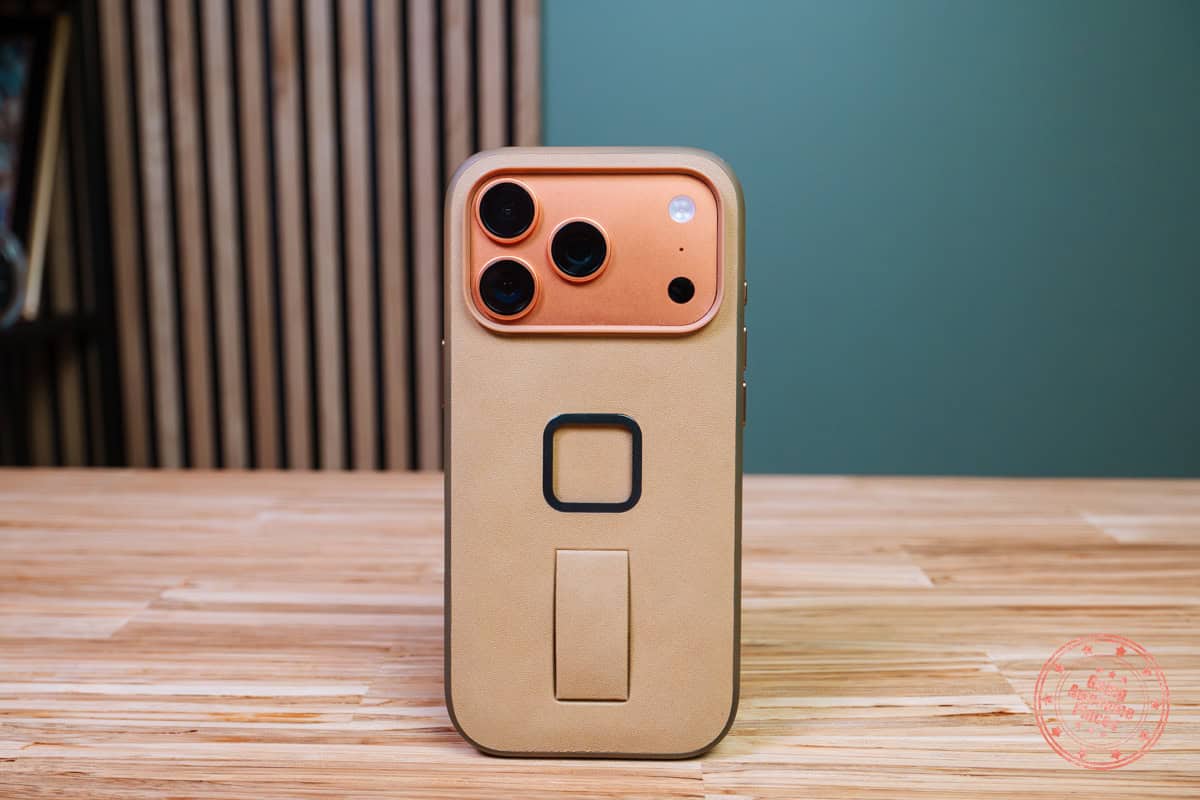
The say the best camera is the one that you have in you. The one device you’re guaranteed to have in your pocket wherever you go is your smartphone and in our case it’s our iPhone 17 Pro.
This is the real workhorse in our collection of camera gear that we use for videography. Not only is it a primary camera when it comes to social media content, it’s also the emergency back-up.
If you wanted to, you could easily shoot everything with the iPhone. The camera technology on this and other smartphones continues to climb to the point where you almost can’t tell in certain situations. As something that fits in your pocket, it’s always available and in today’s social media landscape, the ability to flip between filming vertically and horizontally is hugely important.
The downside to the iPhone is the more cinematic and depth-of-field look. Yes, there’s cinematic mode but it often times looks too artificial. Video out of the iPhone is also over-saturated, contrasty, and over-sharpened.
We use the iPhone for 99% to film for social media (i.e. IG Stories and Reels). For our YouTube videos, we still rely on our other cameras but on days when we don’t want to travel around with too much gear or if there’s a fleeting moment and this is the fastest thing we can whip out.
This is a whole other topic but our largest gripe with the phone though is that we still need to film everything twice – one for social, and one for horizontal video. We’re hoping that in the future, cameras will be able to shoot open-gate (square) to eliminate that problem.
Lastly, why iPhone and not an Android device? We’ll admit that we’re totally biased but from seeing other friends and colleagues, the big advantage is: 1) Airdrop, 2) photos with iCloud, and 3) pro tool apps (i.e. FinalCutCamera and Blackmagic Camera), and 4) best video quality and optics (although I’m sure many will argue with me on that one).
- Environments where you need to be more discreet
- Social media videos
- When other cameras are not available in-hand
- Certain multi-cam scenarios
- Quick selfie videos
- Instant reach with optical or digital zoom
- Formats: MOV, MP4 and M4V (H.264 and HEVC/H.265) with cinematic mode
- Color profiles: ProRes Raw, ProRes Log 2 and HDR
- Maximum resolution: 4K Dolby Vision
- Maximum frames per second: 240FPS (1080P)
- Screen: 6.3″ touch screen
- Maximum recording time: Unlimited
- Vertical video: Yes (but only crops the horizontal video)
- Image stabilization: Sensor-shift optical image stabilization
DJI Osmo Pocket 3
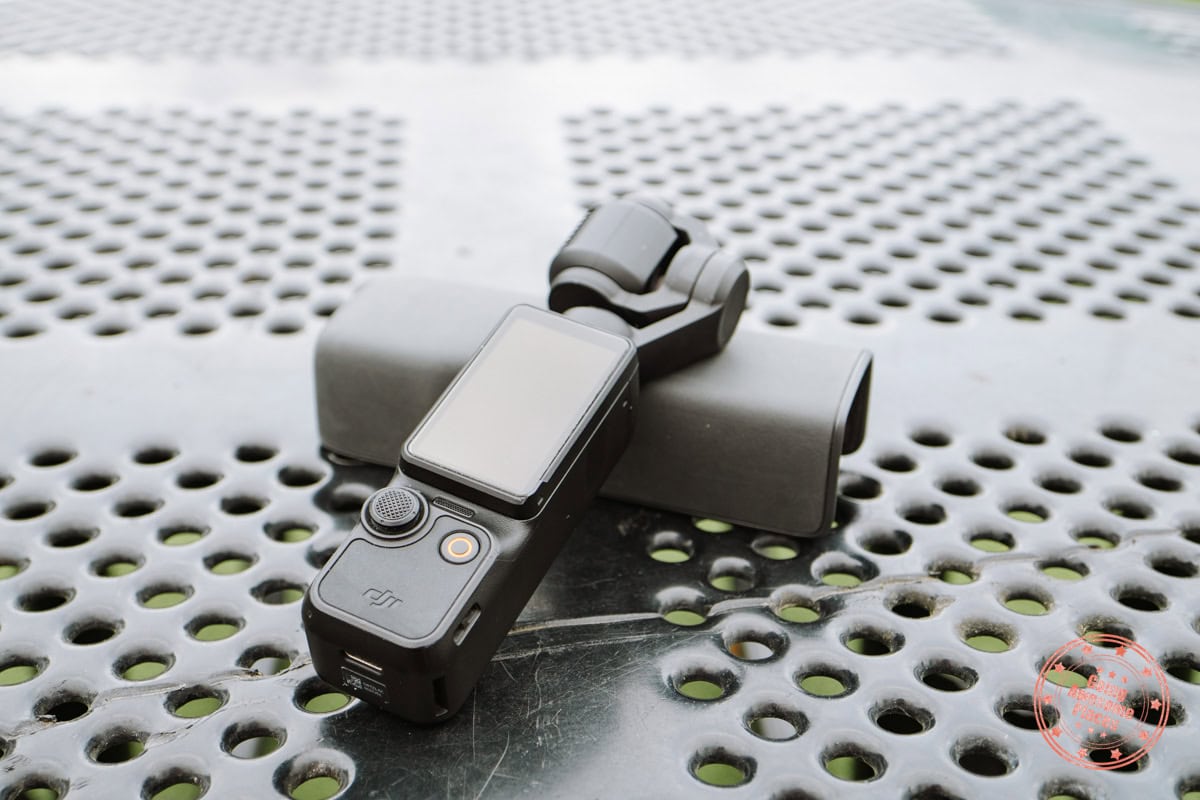
Another nifty innovation from these past few years is DJI’s Osmo Pocket 3. If you watch our Hong Kong video, you’ll be surprised to hear that a majority of it was shot with the Pocket.
While not the same as the iPhone in term of being a do-everything-device, the Osmo Pocket 3 is small enough to fit in your pocket and with it’s wide field-of-view, built-in gimbal, and good quality, it’s one of those devices that makes filming fun again.
In fact, the Pocket has started to replace the OM-1 for a lot of filming because I’m willing to sacrifice quality for ease of setup and quick availability.
The advantage of the Pocket 3 is of course its portability, better-than-you-expect camera quality, gimbal stability, and most importantly, how easy it is to film videos of yourself. This is 10x easier than holding the mirrorless camera. Instead, simply flip the screen and you can do reaction commentary in a heartbeat. You also get the fancy face-tracking if you need that.
The sacrifice you’re making is in that smaller sensor and inability to make smooth focus changes.
- Environments where you need to be more discreet
- Dual wielding with the iPhone to capture vertical and horizontal video simultaneously
- Quick availability from the pocket
- Replacement for the mirrorless camera because it’s easy to operate with one hand
- Selfie talking videos
- Formats:MP4 (MPEG-4 AVC/H.264, HEVC/H.265)
- Color profiles: Normal, HLG, and D-Log
- Maximum resolution: 3840×2160 (4K)
- Maximum frames per second: 100FPS
- Screen: 2″ touch screen
- Maximum recording time: Unlimited
- Vertical video: Yes (but only crops the horizontal video)
- Image stabilization: Built-in gimbal
Recommended Pocket Cameras
Drone
The last primary piece of camera equipment is the drone. We’ve been using the DJI Mini 4 Pro for the past few years after using the larger Mavic-series of drones. We’ll soon be upgrading to the DJI Mini 5 Pro.
Drone videography and photography adds a completely new dimension to the content especially to establish a scene or provide a different perspective that you can only get from the sky.
What we love about the Mini 4 Pro is certainly its size but it’s also its ability to natively shoot vertically, range, battery life, and quality. DJI is still makes the best consumer drones, making it incredibly safe, and easy to get the type manual or quick/master shots you’re looking for.
By down-sizing to a smaller drone, the main disadvantage is in its smaller sensor in its single lens. The Mini 4 Pro uses a 1/1.3-inch sensor versus the Mavic 4 Pro which has 3 lenses with the main one being a 4/3 sensor. There’s a limit to light-gathering and effective pixels but for our type travel videography, it’s not as important.
- Aerial photography and videography
- Action tracking (typically biking or hiking)
- Hands-free video as a tripod but from a higher vantage point
- Formats: MP4 (MPEG-4 AVC/H.264, HEVC/H.265)
- Color profiles: Normal, HLG, and D-Log
- Maximum resolution: 3840×2160 (4K)
- Maximum frames per second: 100FPS
- Screen: 2″ touch screen
- Maximum recording time: Unlimited
- Vertical video: Yes (but only crops the horizontal video)
- Image stabilization: Built-in gimbal
Something we’d love to add to is an FPV drone such as the DJI Avata 2 but we just haven’t had the time to learn and experiment with it yet.
Recommended Drone
Videography Accessories
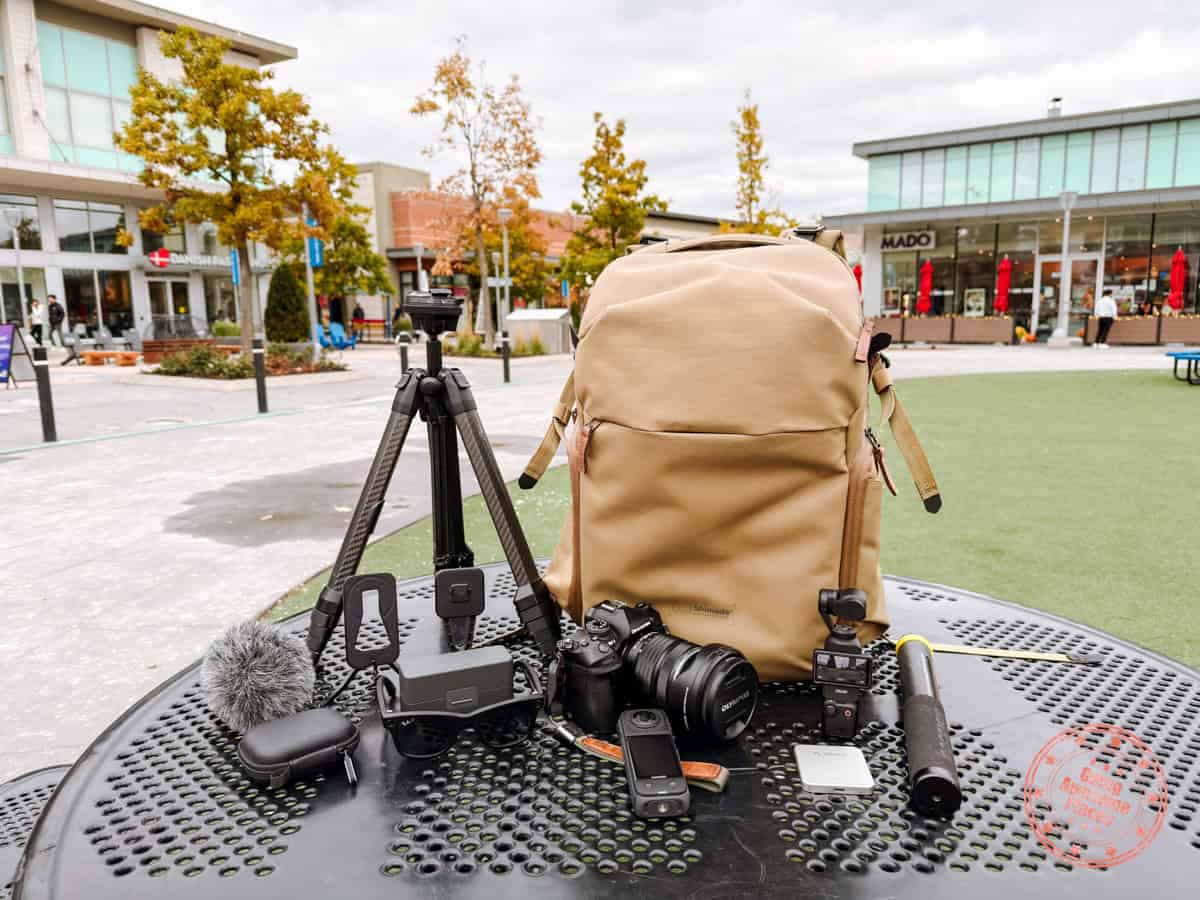
So far, we’ve focused on the main cameras for videography but what are the accessories we use to go alongside with them?
Accessories For Mirrorless Camera
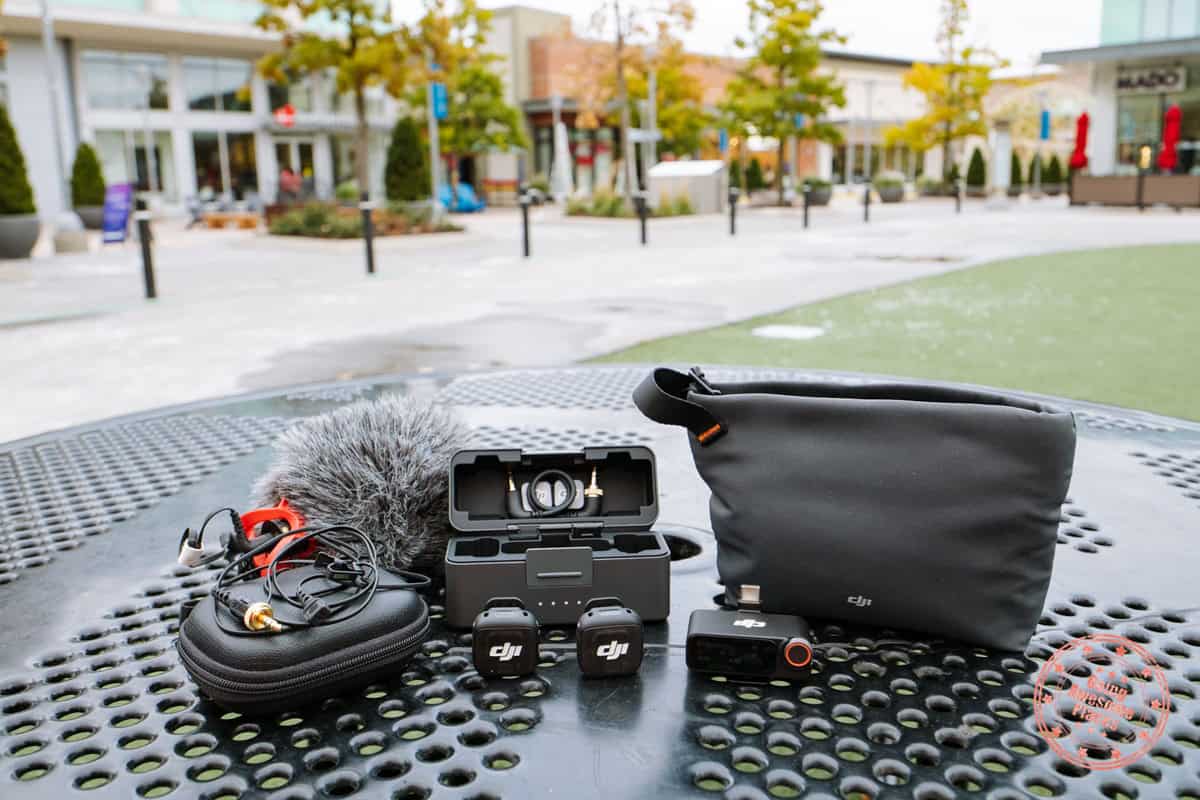
For our OM System OM-1 Mark 2, there quite a number of accessories that we use.
Microphones
- RØDE VideoMic GO II – Having an on-camera shotgun mic is helpful when you know you won’t have time to mic yourself or your subject up and you want better sound quality than the recording on-camera.
- DJI Mic 3 – We also used this with our iPhone and Pocket 3 as a quick wireless mic. Having two microphones is also helpful when you have two subjects.
- RØDE Lavalier II – We paired this with our previous DJI Mic 2 if we’re looking for a cleaner set up. Problem is, the Mic 3 doesn’t have a built-in 3.5mm jack so this is something we’re wondering if it’ll be an issue.
Microphones We Use For Our Mirrorless Camera
Camera Accessories
- Lens Protection Filters – With ND filters built into the camera, at most we use are these filters that protect the front element of the lens. The OM System ones are cheaper on B&H than buying directly.
- Wireless Remote – Bluetooth remote that controls the shutter that’s super handy when doing any photography on the tripod where you want to minimize vibrations.
- Mini Blower – As compact as it gets to help blow away the dust before you use the LensPen.
- LensPen – A must-have for any videographer to make sure you get dust and smudge-marks off your lens.
Accessories We Use For Our Mirrorless Camera
Accessories For Insta360
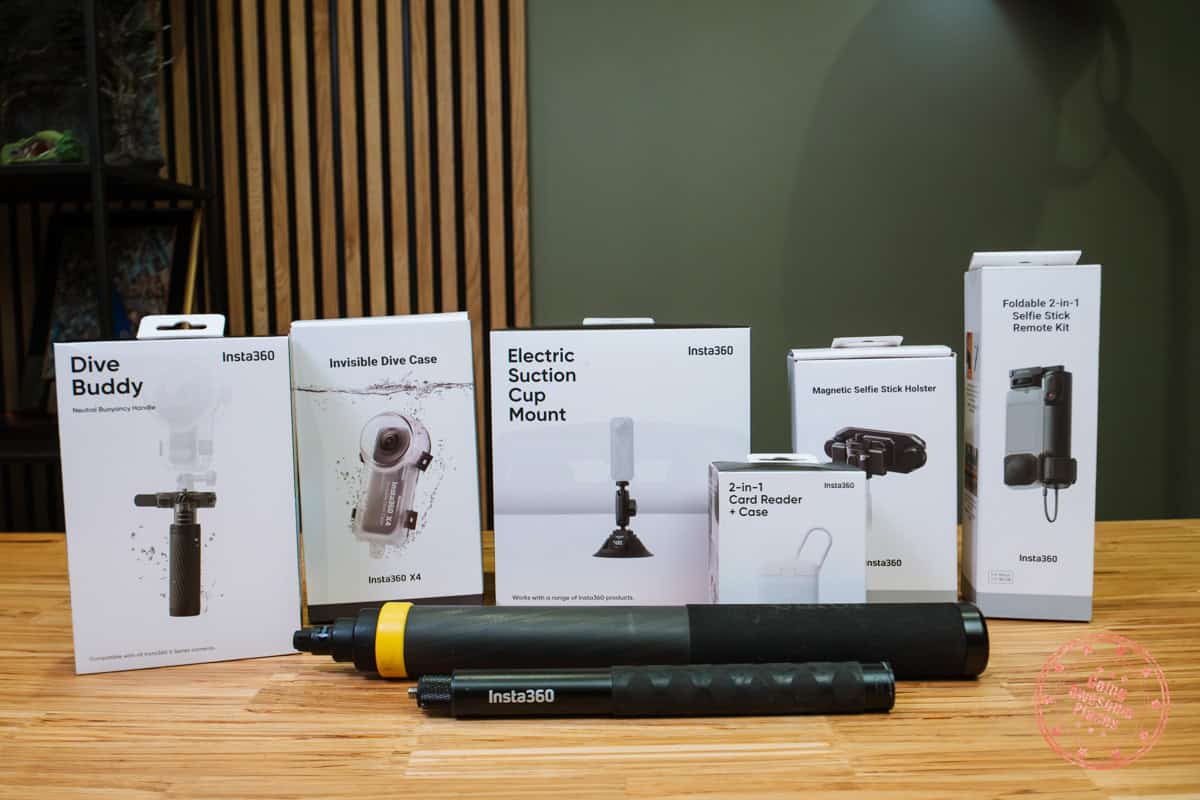
We need a whole section for the Insta360 because there are so many accessories that you can get, depending on the type of sport or activity you’re doing. We’re going to highlight a few of the key ones to make sure you have in your collection.
- Foldable 2-in-1 Selfie Stick – Brilliant new innovation that combines the 360 camera with a selfie stick in a more compact bundle.
- Magnetic Selfie Stick Holster – The Capture works perfectly for our OM-1 and this is what solves it for situations when you want to be able to holster your Insta360 on a selfie stick while hiking.
- Electric Suction Cup Mount – Standard suction cup mounts are always nerve-wracking to use because you never know if it’ll fail after prolonged use which we experienced when going off roading. You’ll love having active monitoring of the suction especially for extremely bumpy roads and cold temperatures.
- 2-in-1 Card Reader + Case – Quality of life accessory where you can transfer files to your phone or computer via USB-C and stores 6 SD or microSD cards. The case itself is also magnetic so it’s MagSafe compatible. That mean’s it’s another way you can extend your phone’s phone storage and allow ProRes 4K60 recording.
- Action Invisible Selfie Stick – The stick that does it all. They have different versions of this but you’ll be using this 90% of the time when paired with the Insta360 X4.
- Extended Edition Selfie Stick – At full extension, this goes 9.8 ft (3m), allowing you to create drone-like shots. This is super handy in places where you drones are not allowed.
Accessories We Use For The Insta360
When it comes to scuba-diving and snorkeling videography, we use the Insta360 X4 exclusively for its beautiful wide-angle perspective thanks to to the invisible selfie stick.
- Invisible Dive Case – On its own, the Insta360 X4 is capable of going 33ft (10m) underwater but if you want to go deeper, you’ll need this special case which you can bring down to 164ft (50m).
- Dive Buddy – This is a newer accessory but what it allows you to do is adjust the buoyancy so that you can either have it drop to the sea-floor or be suspended in the water as you swim around it.
When we upgrade to the X5, we’ll be sure to try the Invisible Dive Case Pro which brings to the table next-level clarity.
Diving Accessories We Use With The Insta360
Accessories For The iPhone

While we do most of our filming with our phone using our barehands, there are several accessories we rely on to make our lives easier.
- Everyday Case – We’ve been using this iPhone case for several years and the main reason is because it pairs with the Creator Kit with that small SlimLink square.
- Mobile Tripod – Incredibly handy tool for a table-top tripod and moments you don’t want to take a selfie video and can find a ledge to place this when you’re traveling.
- Creator Kit – This is meant to be paired with a tripod and the Everyday Case and allows you to set up vertical or horizontal filming.
- Orico Magsafe Mini SSD – If you ever want to film in ProRes on your iPhone or just need to extend your phone’s storage space, this videography accessory comes in capacities up to 2TB.
Accessories We Use With Our iPhone
Accessories For Osmo Pocket
Our DJI Osmo Pocket 3 is a great for quick on-the-fly and off-the-cuff video at a higher quality than the iPhone.
Beyond the Creator Combo which already comes with a battery grip, mini tripod, wide-angle lens and mic the only thing we use are:
- Extension Kit – This attaches to the Pocket and gives a cold shoe on one side and action camera port which opens up all of the other accessories you probably already have.
- Filter Set – A 3-filter set and also comes with a screen protector as well.
Recommended Pocket 3 Accessory
Lighting
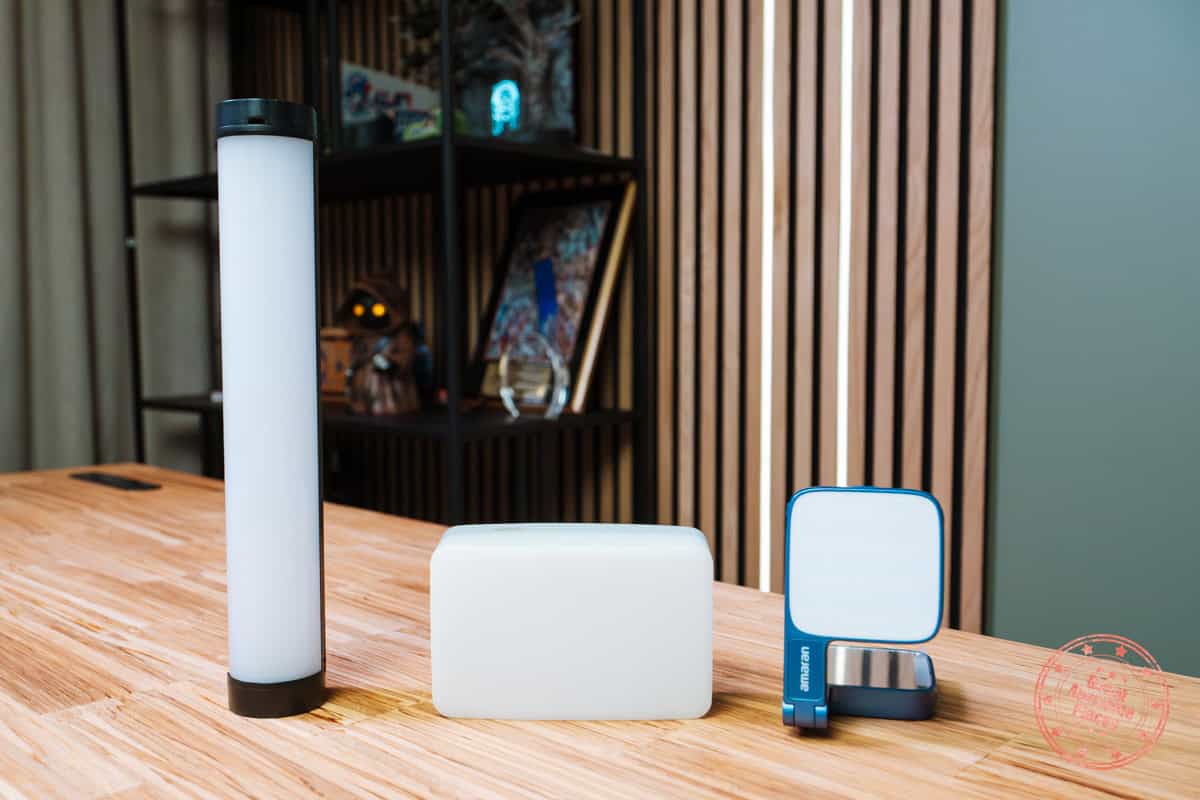
While we’re usually fans of filming in natural light, if we know that we’ll be doing a project in challenging situations, we’ll pack a one or a few of these lights.
- Light Wand – This is a short RGB LED light that has magnets built in and can attach to more of the same lights to make it longer. Tube lights give a specific type of narrow lighting and we like that it’s quite easy to pack as well.
- Pocket LED Light – We will often grab this light because it comes with a silicone diffuser that allows for softer light. This is also capable of full RGB.
- MagSafe Selfie Light – A new addition to our videography gear. With MagSafe, this attaches to the back of the phone and it can flip to provide lighting when filming front or back. It comes with a mirror too for selfies.
Lighting Accessories We Use For Videography
Tripod

This one’s simple. Our go-to tripod that we’ve been using for travel has been the Peak Design Travel Tripod in Carbon Fiber.
While it’s certainly taken a beating over the years, it’s held up. We love how light and compact it is when collapsed. It’s been able to handle all of the crazy conditions we’ve put it through.
The main room for improvement is the ballhead which doesn’t handle vertical shooting that well and doesn’t have built-in panning which is important for video. That’s where the new Peak Design Pro Lite Tripod. It’s a tad heavier and taller but the ballhead is significantly improved with panning capabilities and gives you a bit of extra height as well.
Tripods We Recommend For Videography
Memory Cards
For videography, memory cards a great deal because video files are huge files, especially if you’re shooting in 4K and most devices require a minimum speed to operate.
The two types of cards that we use are the standard SD card for the OM-1 Mark 2 and microSD for Insta360, Pocket 3, and drone.
Here are a few things that we make sure we have with memory cards we use:
- Find a balance of high capacity but also making sure not too high so it forces you to change memory cards. This forces you to make back ups and if a card does fail, you don’t lose as much footage.
- Get the highest speed possible. Some devices are very specific about the speed of the card. For MicroSD cards, 190MB/s is what you’re looking for. With SD cards, look for UHS-II with 300MB/s read and write.
TIP: While there may be higher capacity cards, some cameras aren’t compatible with them so make sure you check the documentation.
Lastly, we also wanted to include the accessories we use to organize the MANY cards we have.
Memory Cards and Accessories We Recommend For Videography
Backpack
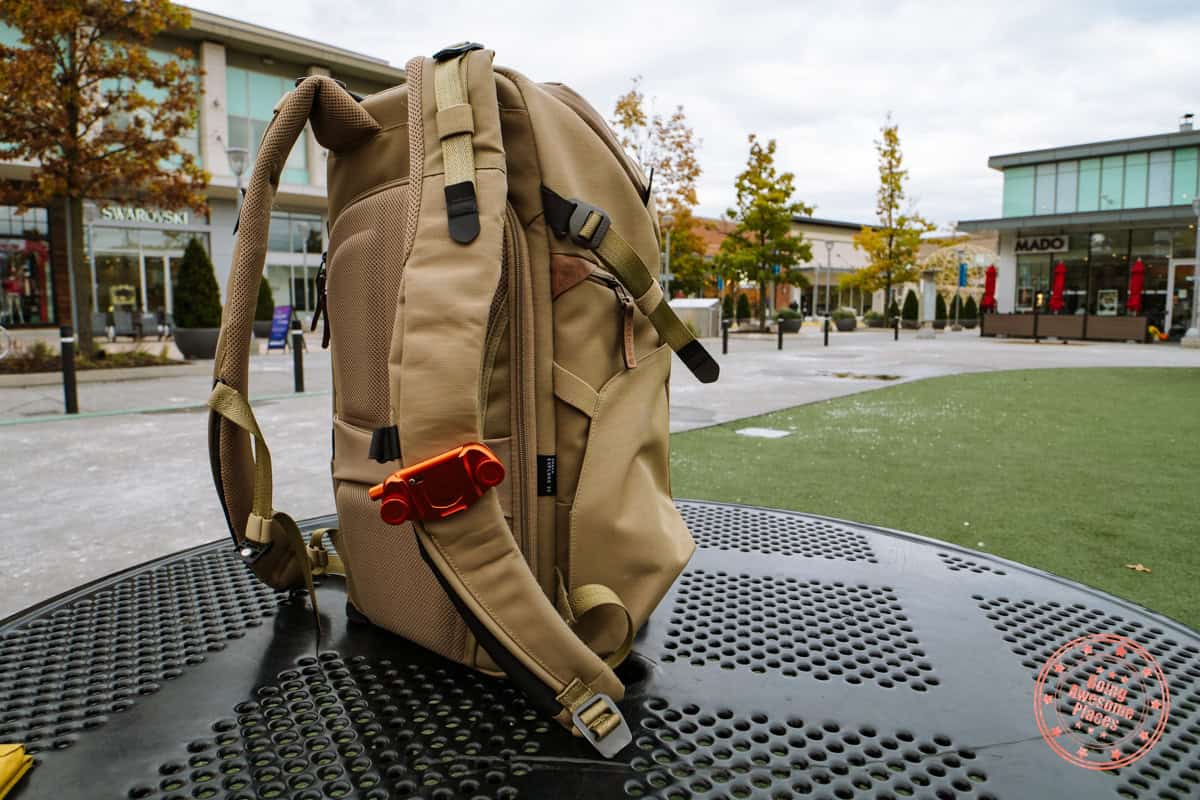
We’ve been big users of Peak Design backpack for years but recently, we’ve fallen in love with the brand Shimoda.
It all started when we were looking for a new hiking backpack to replace the old F-Stop Loka backpack. From our research, we learned that one of the designers that worked there spun off to do his own thing and that ended up being the Shimoda brand.
For my trip to Chilean Patagonia and Torres del Paine which was part of our 1 month in Chile itinerary, I used the Shimoda Action X50. While being able to fit the 150-400mm lens was the main requirement, I was really impressed with how comfortable it was for hiking and it’s ability to store more than just my camera gear.
The most important feature? They have a camera pocket on the left backpack strap which is incredibly handy for quick-access.
The two main backpacks in the line up are:
- Shimoda Urban Explore 25L – True to its name, this is an awesome incognito bag for roaming around the city and travel. The 25L is a middle-ground in size when you don’t need to carry as much gear but still want a camera cube.
- Shimoda Action X50 – We started with the first version and now the V2 adds new features such as an Airtag pocket, improved waist belt, luggage pass-through, and rain-cover.
Both of our backpacks have a Peak Design Capture attached to it. The orange one you see in the photo is a special edition collaboration with Carryology.
Our Favourite Camera Backpacks
Software
To close things off, readers always ask us what we use for video editing so I thought we’d add a section on the important tools we use.
- Final Cut Pro – While many will ask why we don’t use Adobe Premiere but it’s one of those things where I learned how to edit on FCP and so I’ve been comfortable with it and it can do everything I want to do.
- Insta360 Studio – Since we use our Insta360 quite a bit now, their 360 footage editing software is key. Workflow wise, we create short clips from this tool and then we import them into Final Cut Pro.
- Epidemic Sound – This is where we get all of our music. It’s nice to pay once and be able to use anything in the entire library including for social media.
- Various FCP Plugins – We use an assortment of plugins in Final Cut Pro for things like titles, lower thirds, audio and effects. The two main ones we use are MotionVFX and Pixel Film Studios. For our voiceovers, we use Waves and the Tony Maserati Signature Series.
Software We Use For Video Editing
Frequently Asked Questions
We don’t travel with a gimbal because 1) it’s too heavy and awkward to use and pack away when you’re on the go and 2) the image stabilization on the OM-1 Mark 2 is so good even when hand-held.
We film in 4K for both vertical and horizontal videography because we’ve switched to 4K videos for our YouTube channel. For social media, we stick to 4K because we never know when we might need smartphone footage in horizontal and vertical format. Even if we don’t, it also gives us flexibility for cropping in if we need to.
Currently, we have an Apple MacBook Pro 14″ with the M1 Max chip which has more than enough power to handle 4K video editing.
Read More About Photography
If you’re in the process of planning your trip and putting together your itinerary, these are genuinely the best resources that the Going Awesome Places team stands by 100%.
Credit Cards
Don’t get burned by hidden fees on top of terrible exchange rates. When we travel now, we use the Wise Card. Simply load it with the currency you need before you go and use it as a regular VISA or their digital wallet card. Use their free app to track how much you have and top up when you need to.
Flights
In our opinion, of all the booking search engines, Skyscanner is the most helpful and easy to use thanks to their Everywhere feature. Kayak is also another that’s we will often check.
Rideshare
You probably already have accounts but if you don’t, for new Lyft users, use code WILLIAM4825 to get 50% off your first 2 rides (max $10 per ride). Offer valid for 14 days after you take your first ride. For new Uber users, use code cbh4j6plxt8p for the same offer except it’s valid for 30 days.
eSIM
eSIM: Lately, we’ve really loved using eSIMs. We’ve tested several over the years and we have access to a few special promotions.
- AmigoSIM – Use GOINGAWESOMEPLACES to save 25% off. Code is re-useable.
- Gigsky – Use TANG149 to get $3 USD when you sign up, then use code GOINGAWESOME to save 20% on all eSIM orders.
- Airalo – Use referral code WILLIA9500 to get $3 USD credit on your first purchase.
- KnowRoaming – Use code GAP10 to save 10%.
- AloSIM – Use code GOINGAWESOMEPLACES to save 15%.
- Ubigi – AWESOME10 to save 10% on your first order.
- Holafly – Use code GOINGAWESOMEPLACES to save 5%.
- Roamless – Use code AWESOME20 to save 20.
- Saily – Use code GAP15 to save 15%.
Wifi Hotspot
We’ve been a huge fan of wifi hotspot devices such as PokeFi (use code GAP24300) because their rates are are hard to beat and it works globally. Solis is another that we recommend. Pros are that you can share the wifi with your whole group but cons are that you have to invest in a device and you have to charge it every night.
Hotels
Our go-to is Booking.com because they have the best inventory of properties including hotels and B&Bs plus they have their Genius tier discounts. Expedia is also worth using especially with their One Key rewards program which is basically like cash. The exception is Asia where Agoda always has the best prices. Always do a quick check on TripAdvisor as well.
Tours and Activities
When planning our trips, we always check both Viator and GetYourGuide to at least see what’s out there in the destination that we’re going to. They often have different offerings and prices so check both.
Travel Insurance
Learn how to buy the best travel insurance for you. This isn’t something you want to travel without.
- HeyMondo – Popular insurance provider for frequent travelers and comes with great coverage and special perks. By booking through our link to get a 5% discount!
- RATESDOTCA – Search engine Canadians looking for the cheapest insurance including multi-trip annual policies.
- SafetyWing – A perfect fit for long-term nomads.
- Medjet – Global air medical transportation.
- InsureMyTrip – Best for seniors, families, and those with pre-existing conditions.
Check Out Our Toolbox
If you need more help planning your trip, make sure to check out our Travel Toolbox where we highlight all of the gear, resources, and tools we use when traveling.